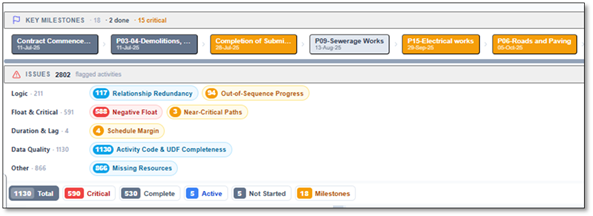
Every scheduler has had this experience. The bars line up. The dates look right. The critical path runs cleanly from notice-to-proceed to handover. Then a client's DCMA-trained reviewer runs an assessment, and the schedule lights up red.
The visual polish was never the point. The 14-point assessment doesn't ask whether your Gantt is pretty — it asks whether your schedule is a connected, dynamic model that will recalculate correctly when reality intervenes. Most schedules look finished long before they actually behave like one.
What the 14-point assessment actually measures
The Defense Contract Management Agency's 14-point assessment is a mechanical health check. It largely ignores whether your sequence makes sense (that's engineering judgement) and instead asks: if an activity slips, will the network respond the way a forecast model should? A schedule full of hard dates and open ends can't do that — it's a picture of a plan, not a working model of one.
Most of the checks carry explicit thresholds. These are the ones reviewers run first:
| Check | What it flags | Typical target |
|---|---|---|
| Logic | Activities missing a predecessor or successor | < 5% |
| Leads | Negative lag (work starting before its driver finishes) | 0 |
| Lags | Relationships padded with waiting time | < 5% |
| Relationship types | Over-reliance on anything but Finish-to-Start | FS ≥ 90% |
| Hard constraints | "Must finish on", "Mandatory start" dates | < 5% |
| High float | Total float greater than ~44 days | < 5% |
| Negative float | Activities already behind the network | 0 |
| High duration | Activities longer than ~44 working days | < 5% |
| Invalid dates | Forecast in the past, actuals in the future | 0 |
| CPLI / BEI | Critical-path realism & baseline execution | ≥ 0.95 |
The checks schedules fail most
Missing logic — the open ends
The single most common failure. An activity with no successor is a dead end: delay it and nothing downstream moves, so the schedule under-reports its own risk. Dangling activities are how a project can be "behind" everywhere on the ground and still show a green forecast on paper.
Negative lag and lag abuse
A lead (negative lag) tells the engine that work can start before its driver finishes — physically meaningless on most jobs and a fast way to manufacture float that isn't real. Excessive positive lags hide scope: a 20-day lag is almost always a missing activity in disguise.
Hard constraints
"Must finish on 30 June" feels like control. It's actually a lie to the network — it pins a date regardless of what the logic says, suppresses negative float, and masks the very slippage you need to see. A schedule heavy with constraints stops forecasting and starts wishing.
High float, long durations, invalid dates
Total float of 200 days usually means an activity is floating free of the network, not that you have six months of slack. Activities longer than a reporting period can't be progressed meaningfully. And a forecast start in the past — or an actual in the future — means the data date and the schedule have quietly diverged.
Why a "green-looking" schedule can still be unrealistic
Here's the uncomfortable truth: a schedule can pass all 14 checks and still be wrong, and it can fail several and still describe the job perfectly. DCMA measures mechanics, not engineering reality. A clean network with optimistic durations is still optimistic.
But the inverse matters more. A schedule that fails the logic, constraint and float checks cannot be trusted to forecast anything — because the moment something slips, the network won't carry that slip forward. That's why reviewers care so much: the checks aren't bureaucracy, they're a test of whether your forecast is load-bearing.
A constraint-heavy, open-ended schedule doesn't predict the future. It just redraws the picture you wanted to see.
What it costs you downstream
Failing these checks rarely hurts on day one. It hurts later, all at once:
- Audits and submissions stall. Government and tier-one clients reject schedules that breach DCMA thresholds, costing you review cycles you didn't budget for.
- Delay claims get weaker. An extension-of-time claim is only as strong as the network behind it. Open ends and hard constraints are the first thing the other side's forensic planner attacks.
- Slippage arrives as a surprise. A schedule that can't carry delay forward forecasts on-time right up until it doesn't.
- Credibility erodes. Once a client finds one constrained date masking float, they stop trusting the whole file.
Run the 14-point check in seconds — then fix it
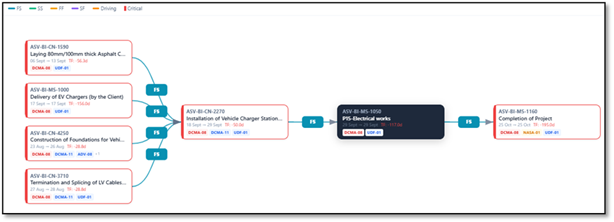
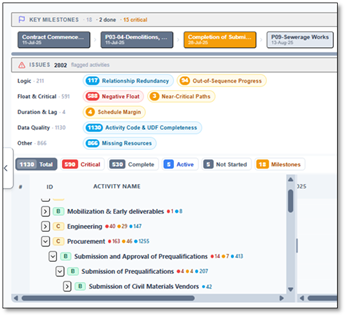
Drop a Primavera P6 or MS Project file into Diagnose mode and Nahla runs the full 14-point assessment automatically. Each check shows pass or fail against its threshold, with the exact activities that tripped it — no manual filtering, no spreadsheet of open ends to assemble by hand.
Because Diagnose is read-only, it's audit-safe: you can hand the assessment to a client without touching the source schedule. And when you're ready to act, the same project opens in Build mode, where the CPM engine re-validates after every change and offers one-click resolutions for flagged conflicts. Spot it in Diagnose, fix it in Build, re-check in seconds.
The takeaway
A DCMA failure isn't a grading insult — it's a signal that your schedule isn't yet a working model. Fix the logic, retire the hard constraints, and the same checks that flagged you become your strongest evidence that the forecast can be trusted. The fastest way to get there is to run the assessment early and often, instead of discovering it in a client's rejection email.